Agents
Talk to your Telegram agents with text, photos and voice
An independent Android companion for your Maverick glasses.
A growing collection. One familiar Home.
An independent developer community app built with Everysight’s SDK.
Not affiliated with Everysight or its official companion app. Read the disclaimer ↗
A shared Home. Thoughtful mini-apps.
A little more context, without losing the bigger picture.
 WEATHER
 UP NEXT
 TIMER Timer FOCUS SESSION
 Notes A LITTLE INSPIRATION
The best ideas tend to
happen away from a desk.
Your day, brought together. Widgets and apps share one familiar Home.
Talk to your Telegram agents with text, photos and voice

Web pages on your glasses
Your phone's calendar: now, next and the rest of today

Photos and clips from the glasses

Live captions of what is said around you

Clips, phone camera and streams

Heading and level

Your eToro portfolio in EUR

Eye tracker, blinks, gaze calibration

Pictures on your glasses

Your Gmail inbox: read, reply, forward, delete

Practise typing with the joystick

Your phone screen on the glasses

Perspective turn guidance, route view and live trip progress
Read and write notes

Phone, app and system notifications

Your script, line by line

Voice memos from the glasses microphone

Display, audio, device

AR compass and models
Timers · stopwatch · focus
Hear it, read it in your language
Forecast for your city

Run - time, distance, pace, steps
Included in the current development build. Some apps need permissions, a connected account, network access, or compatible hardware.

Your Android phone runs GlintOS. Your glasses bring it into view. Our independent community companion interface keeps everything together.
Pair your Maverick AI or AI Pro from the companion app.
Choose widgets, manage app access, and adjust text size or motion settings.
Swipe to move. Tap to open. Your temple touchpad keeps you in control.
Maverick AI & AI Pro glasses.
One GlintOS companion for both models.
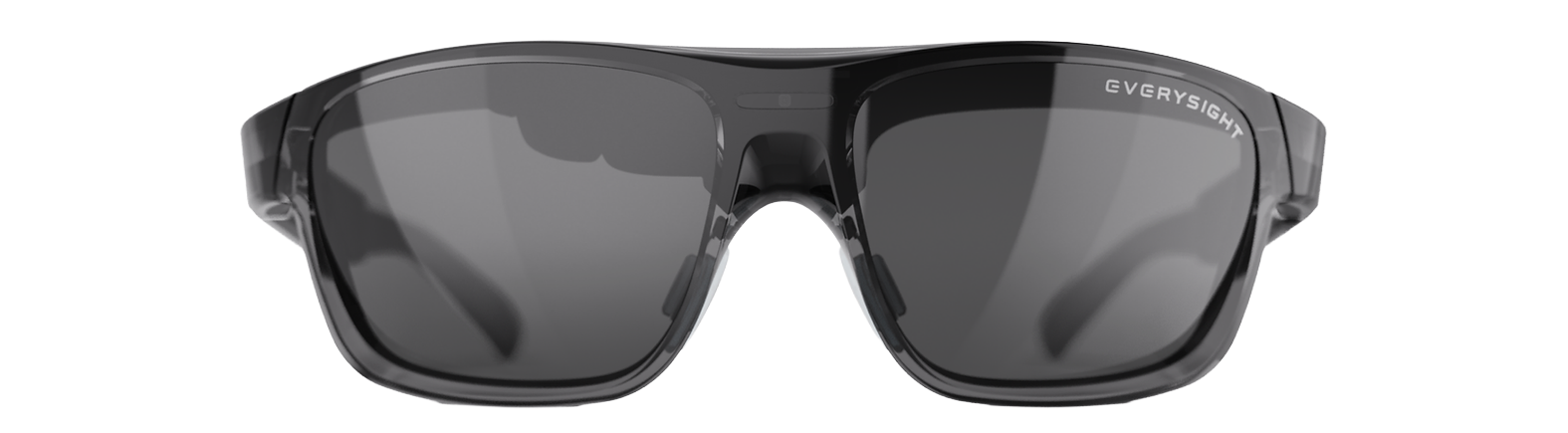 FAMILIAR FORM. A DIFFERENT PERSPECTIVE.AI PRO + NATIVE EYE TRACKING
BEAM™ optics and a Sony micro-OLED display bring glanceable information into view.
A daylight-visible field of view, with options for clear, tinted, and prescription lenses.
The Pro adds native eye tracking with GazeIntent™. A temple touch controller is there, too.
Hardware details from Everysight’s published specifications; features and performance depend on the model. GlintOS device validation is still pending.
More integrations and a faster, more polished experience. Here’s what we’re working toward.
Timing and planned features may change as development and testing continue.
New additions to the app collection:
Performance, stability, and interface polish to prepare GlintOS for public release.
The APK link will appear on this website when the release is ready.
GlintOS is Android first. An iOS release is not currently available.
Third-party services may require their own accounts, subscriptions, or API access. Any such charges are separate from the free GlintOS app; compatible glasses are also purchased separately.
Yes. Each mini-app is an independent module that uses the OS’s shared interface and capability ports. Developers can use a local Android build with an Everysight SDK key and the glasses simulator.
No affiliation or endorsement. GlintOS is an independent, third-party developer community project built using Everysight’s software development kit (SDK). It is not developed, owned, operated, sponsored, endorsed, certified, or supported by Everysight or the original developers or manufacturers of Maverick AI or Maverick AI Pro glasses. The GlintOS developers are separate from the glasses’ developers and manufacturer.
A separate community app. GlintOS is not Everysight’s official or proprietary companion app, firmware, or operating system. References on this website to a “companion app” describe GlintOS’s own independently developed Android interface. Use of Everysight’s SDK provides a technical integration and does not, by itself, establish a partnership, approval, or endorsement. GlintOS makes no claim of ownership over Everysight’s hardware, SDK, or proprietary software.
Trademarks and third-party materials. Everysight, Maverick AI, Maverick AI Pro, BEAM, GazeIntent, and related product names, marks, logos, and images belong to their respective owners. They are referenced to identify the hardware, technology, or compatibility being discussed. All other third-party names and materials remain the property of their respective owners. No ownership rights or licenses to those materials are granted by this website. The SDK and any connected third-party services remain subject to their own terms, licenses, and policies.
Development status and responsibility. GlintOS is an experimental project under active development. Website demonstrations use illustrative interfaces and sample data; they are not evidence of manufacturer approval or real-device performance. Features, compatibility, and availability may change, and real-glasses validation is pending. To the extent permitted by applicable law, the project and this website are provided “as is” and “as available,” without warranties of merchantability, fitness for a particular purpose, or uninterrupted or error-free operation. Project questions and issues should be directed to the independent GlintOS maintainers, not Everysight as the project’s developer or support provider. Nothing in this disclaimer excludes any rights or liabilities that applicable law does not allow to be excluded.